In the Survey & Proxy Analyses screen, subscribers may filter, load, and review source proxy data (for US areas), information circular data (for Canada), or annual report data (for UK/Europe areas) for comparable companies using the Refine List window.
Please note: For any given analyses, you may find that there are comparable companies listed for which there is no corresponding proxy data point on the graph. Please see Using XA FAQ #4 for an explanation.
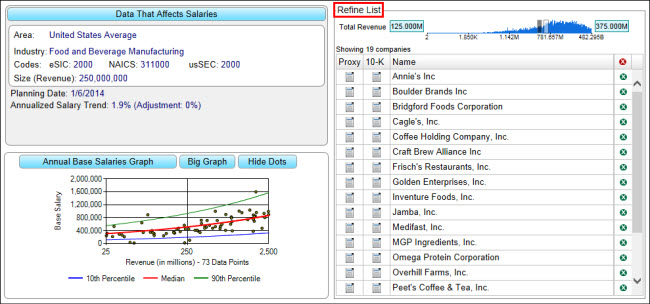
To Filter the List of Comparable Companies
1.Select a geographic location using Salary Adjustments.
2.Select an industry using Salary Adjustments.
3.Adjust the minimum and maximum Total Revenue settings by sliding the grey and white bars, respectively, on the number line. (Please note: organization size for most industries is defined in terms of annual Revenue. For some industries, the organization size is defined in terms of Assets, Fiscal Year Budget, or # of Employees. The Total Revenue slider will be labeled accordingly.)
Please note: The list of comparable companies displayed in the Refine List window includes those companies with an organization size (e.g., revenue) inside the limits set on the range slider and matches the companies list displayed in the Valuations screen or the Customize Executives screen in the Comparables tab (depending on the edition). Changing the minimum or maximum organization size using the range slider only affects the number of companies in the list; it does not affect the organization size selected in the Salary Adjustments dialog or the dots displayed on the graph. Changing the organization size in Salary Adjustments impacts two things: (1) it modifies what is shown in the graph, and (2) it adjusts the range slider by setting the end points to 50% below and 50% above the organization size selected in Salary Adjustments. Changing the organization size in Salary Adjustments only affects the comparable company list so far as it modifies the minimum and maximum settings in the revenue slider.
To Delete One or More Table Rows
To Load the Proxy or 10-K for a Comparable Company
1.Click on the  button in the Proxy or 10-K column for a selected company.
2.In the SEC Filing dialog, select a Filing Year.
3.Follow the Click to open proxy OR Click to open 10-K link to view the proxy or 10-K hosted at www.sec.gov.
To Load the Information Circular (Canada) or Annual Report (UK/Europe) for a Comparable Company
1.Click on the button in the Circular OR Report column for a selected company.
2.In the Download Source Document dialog, click on a Filing Year to save the form.
To View Summary Compensation Tables
To Export the Table
See Export to PDF
See Export to Excel
To Print the Comparable Companies List
See Printing