To Change the Percentiles or Mean/Median in the Individual Profile Screen
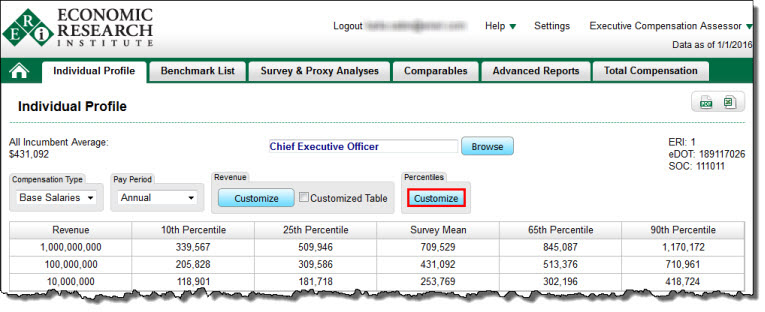
| 1. | Click on a the Customize button below Percentiles. |
 |
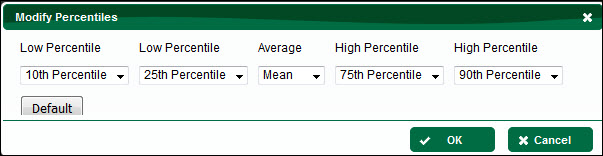
| 2. | In the Modify Percentiles screen, select the desired percentiles or mean/median using the drop-down menus: |
•For Low Percentile 1 and 2, you may select range minimum percentiles between the 10th percentile and the 45th percentile.
•For the Average, you may select either mean or median.
•For High Percentile 1 and 2, you may select range maximum percentiles between the 55th percentile and the 90th percentile.
3.Select Default to reset the percentiles to 10th, 25th, mean, 75th, and 90th percentiles.
To Change the Percentiles or Mean/Median in the Survey & Proxy Analyses Screen
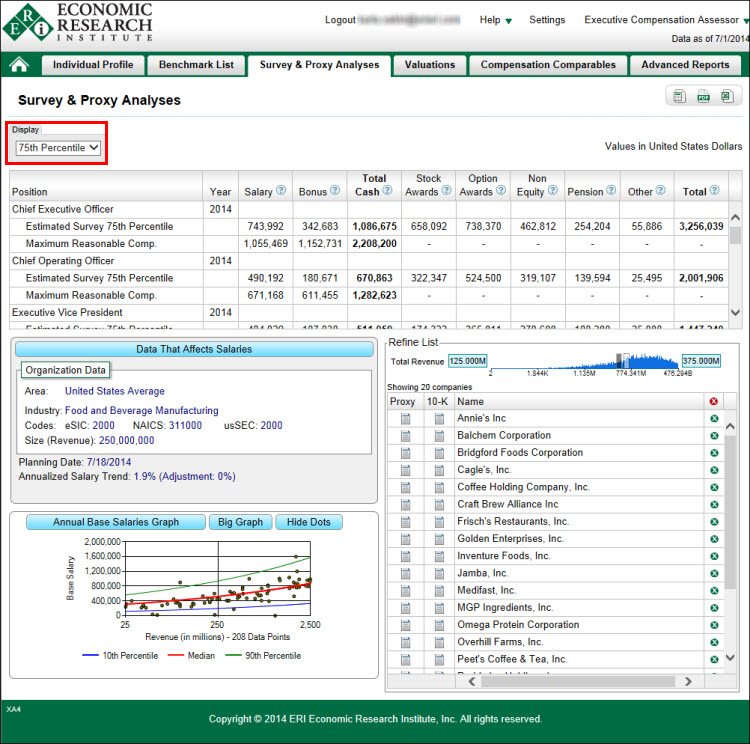
1.Click on the button below Display.
2.Select either the mean, median, or the 10th, 25th, 75th, or 90th percentile (the default is the mean).
3.All of the pay elements for each job reflect the new setting.
See Percentiles and Mean/Median for definitions of terms and more background information.