The Executive Compensation Assessor (XA) allows users to import up to 500 job titles to the Benchmark List from a .CSV file. ERI provides users with a .CSV file template to simplify the upload process.
To Create a .CSV File
1.Click the  button in the upper-right corner of the Benchmark List to download and save a .CSV file template.
2.Open the .CSV file template using a spreadsheet program like Microsoft Excel.
3.A header row is required to identify the columns (included in the .CSV file template). The following column headers are acceptable (the program is not case-sensitive):
Position, Job Title, Title
Salary, Actual Salary
Any data that is not formatted correctly in the .CSV file will not be displayed in the Benchmark List table. The following example displays the correct format for the .CSV file:
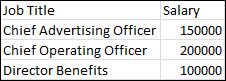
4.Once the table is complete, give the file a unique name (different from the template file name) and save the file in a .CSV (comma delimited) format.
5.Close the .CSV file.
To Import a .CSV File
1.Click the  button in the upper-right corner of the Benchmark List.
2.In the File Upload window, select the .CSV file to upload by clicking the Browse button and Open. Then click OK.
3.In the Upload List from File window, the rows that have been successfully imported are displayed. Any jobs that do not match ERI jobs are displayed with either an "Error" status or as "Not Subscribed' (suggesting that you contact ERI to consider another software edition that may contain a suitable job match).
4.Click OK to return to the Benchmark List table.
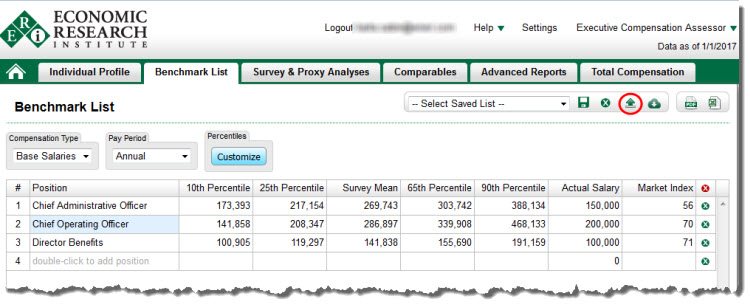
The .CSV file shown above will be displayed as follows in the Benchmark List table.
To Export the Table
See Export to PDF
See Export to Excel
To Save the Table
See Save Table
To Print the Table
See Printing